Run databases and services locally
On this page
Add services on the Services screen with Add service. Each one is downloaded on first use from its project's official releases, checked against the SHA-256 the project publishes where there is one, and listens on 127.0.0.1 only, so other computers on your network can't reach it.
Services are part of Short Leash Pro. Without it, a service that's running keeps going until you stop it, and Back up now still exports its data.
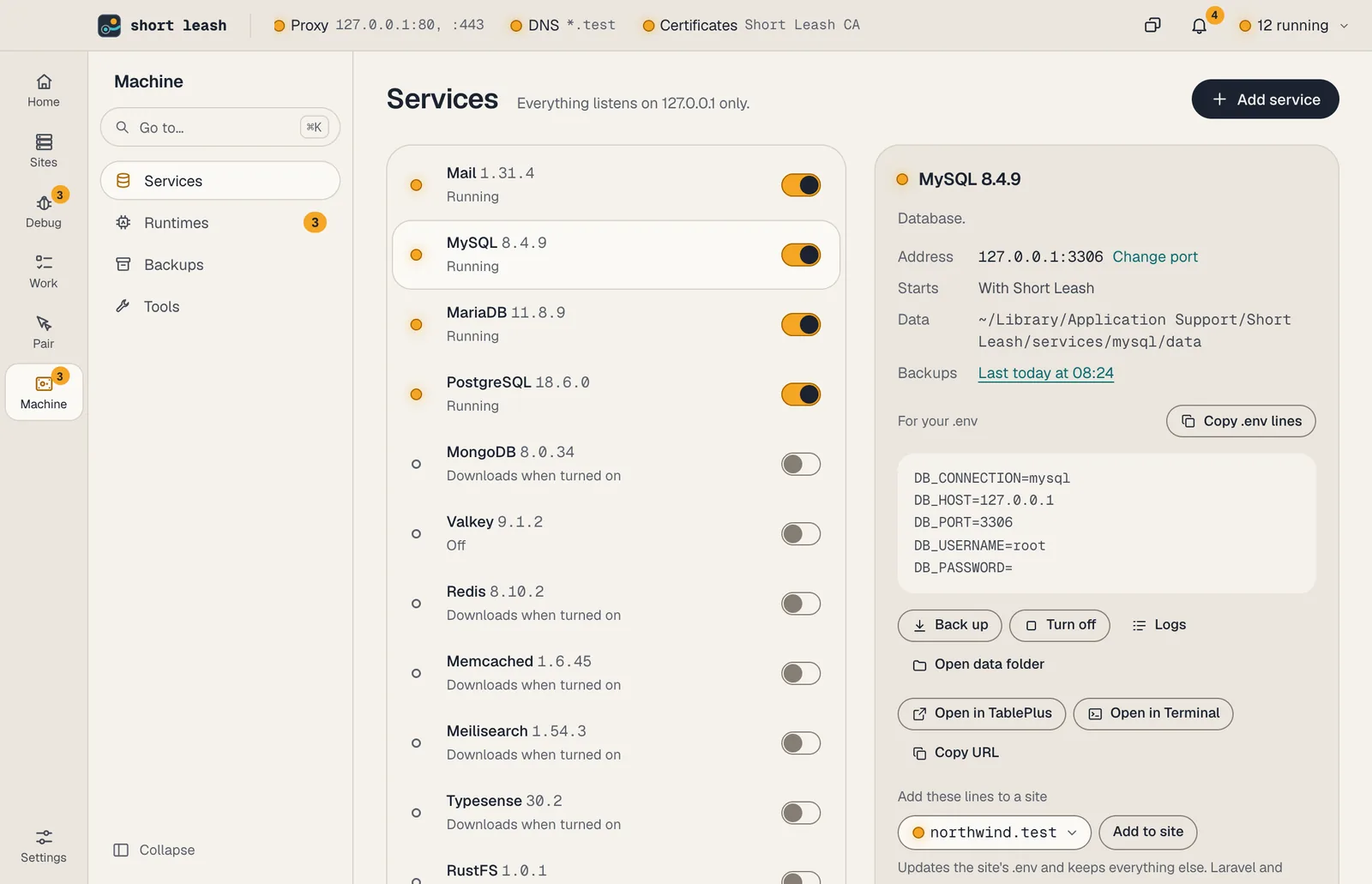
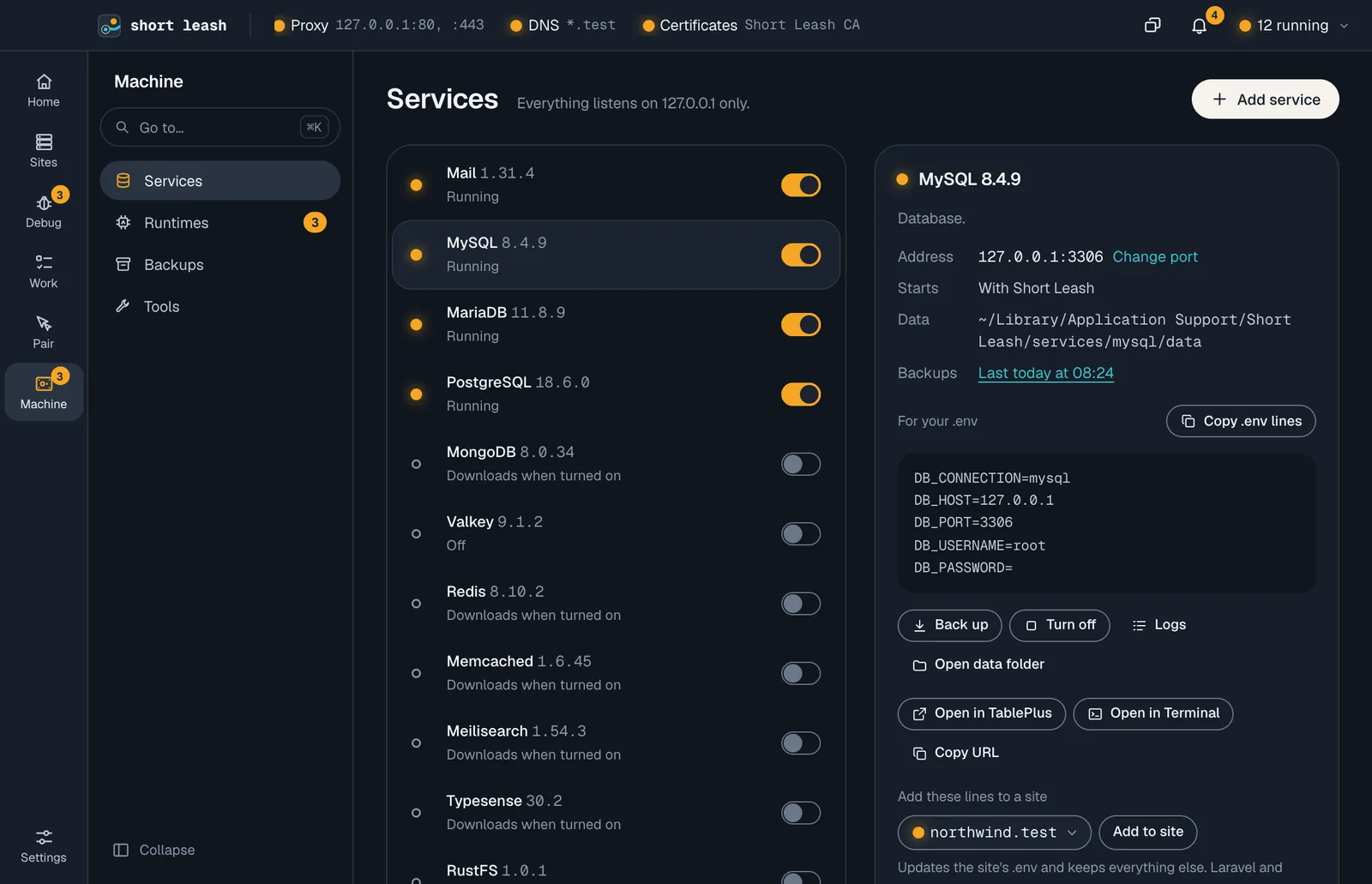
| Service | Versions | Default port |
|---|---|---|
| MySQL | 9.7, 8.4, 8.0 | 3306, or the next free port beside MariaDB |
| MariaDB (MySQL-compatible) | 11.8, 10.11 | 3306, or the next free port beside MySQL |
| PostgreSQL | 18, 17, 16, 15, 14 | 5432 |
| MongoDB | 8.0, 7.0 | 27017 |
| Valkey (Redis-compatible), on macOS | 9.1, 8.1, 7.2 | 6379 |
| Redis, on macOS | 8.10, 8.2, 7.2 | 6379, or the next free port beside Valkey |
| Garnet (Redis-compatible), on Windows | 2.2 | 6379 |
| Memcached, on macOS | 1.6 | 11211 |
| Meilisearch | 1.54 | 7700 |
| Typesense, on macOS 13.1 or later | 30.2, 29.0 | 8108, with 8107 for peering |
| RustFS (S3-compatible storage) | 1.0 | 9000 |
| Laravel Reverb | 1.12 | 8080 |
| Mailpit 1.31 | 2525 |
On a Mac, MySQL and PostgreSQL need macOS 15 or later, because their downloads are built for it. On macOS 13 and 14 they show Needs macOS 15 or later instead of starting, and Add service, leash service add and coding assistants give the same reason and don't add them. On macOS 13 and 14, use MariaDB for MySQL apps: Short Leash builds it for macOS 13 and later, and Laravel connects with DB_CONNECTION=mariadb.
Valkey and Redis have no Windows build, so on Windows the Redis-compatible service is Microsoft's Garnet. Laravel connects to any of them with the same REDIS_* settings.
Memcached is Short Leash's own build, so it needs no developer tools on your Mac. It shows Not available on Windows yet on Windows, because there's no current Windows build Short Leash can verify (0022). Laravel uses it with CACHE_STORE=memcached, and PHP's memcached extension is in Short Leash's PHP builds.
Where MariaDB, MongoDB, PostGIS, Redis and Typesense come from, how each download is checked and what Short Leash does and doesn't include is in 0077.
MariaDB
MariaDB 11.8 is the long-term support release Short Leash recommends; 10.11 is there for older apps. It takes port 3306 like MySQL. Whichever of the two you turn on second takes the next free port the first time it starts, and keeps it; Change port offers to go back to 3306 only once the other no longer holds it. A service that has run before never moves by itself: if the other holds its port, its row names that service and asks you to move one of them.
On a Mac, MariaDB is Short Leash's own build, made for macOS 13 and later and checked against a signed list of SHA-256 sums. On Windows it's mariadb.org's release from archive.mariadb.org, checked against the sha256sums.txt published beside it; Short Leash refuses the download if that file can't be read.
Laravel connects with DB_CONNECTION=mariadb, which Add to site writes, as the user root with no password. Backups use MariaDB's own mariadb-dump.
Redis
On a Mac you can run Redis itself beside Valkey. Redis 8.10 is the newest; 8.2 and 7.2 are there for apps that need them. Redis publishes no macOS build, so Short Leash builds it on your computer the first time you turn it on, which takes about a minute and needs Apple's command line tools (xcode-select --install). Valkey is built the same way.
Before anything is unpacked, Short Leash checks the source download from download.redis.io against the SHA-256 in Redis's own list of release hashes (the redis/redis-hashes repository), and Valkey's against valkey-io/valkey-hashes. If the list can't be read, doesn't name the file, or names it twice with different sums, Short Leash refuses the download and nothing is built.
Short Leash builds only the Redis server and redis-cli, without TLS. The modules Redis 8 bundles, such as the query engine, JSON, time series and probabilistic types, aren't included.
Redis listens on 127.0.0.1 only, in protected mode, with its data in Short Leash's folder. It starts from Short Leash's own config file, redis.conf in its data folder, and never reads another. Changes you make there are kept, but Short Leash always sets the port, the address, protected mode and the data folder when it starts Redis.
Valkey and Redis both use port 6379. Whichever you turn on second takes the next free port the first time it starts, and keeps it, as MySQL and MariaDB do.
Redis 8 is available under your choice of RSALv2, SSPLv1 or AGPLv3, and Redis 7.2 under BSD-3-Clause. Short Leash doesn't include Redis: it downloads the source and runs the result as its own program.
Typesense
On a Mac you can run Typesense for search. Typesense 30.2 is the newest; 29.0 is there for apps that need it. Its builds need macOS 13.1 or later; on macOS 13.0 it shows Needs macOS 13.1 or later instead of starting, and Add service doesn't offer it. Typesense publishes no Windows build, so it isn't offered on Windows.
Short Leash doesn't include Typesense: the first time you turn it on, it downloads Typesense's own macOS build from dl.typesense.org and runs it as its own program. dl.typesense.org publishes no checksums, so Short Leash carries the SHA-256 of each version's download, copied from Typesense's own Homebrew formulas (its typesense/homebrew-tap repository, at commit e1cbb07). If the download doesn't match, Short Leash refuses it before anything is unpacked, and nothing is installed. A newer Typesense comes with a Short Leash update.
Typesense listens on 127.0.0.1 only: its API on 8108 and its peering service on 8107, the port just below. Peering is how Typesense nodes find each other; a single node still opens it, and Short Leash keeps it on loopback too. The two ports move together: if another service holds either one, Typesense takes the next free pair the first time it starts, and Change port refuses a port whose pair another service holds.
Every Short Leash Typesense uses the API key leash, shown in its connection settings. It isn't a secret: Typesense is reachable only from your own computer, where anything could read Short Leash's settings anyway. Short Leash passes the key to Typesense in its environment, never on its command line. Typesense counts as started once GET /health answers {"ok":true}, after it has loaded its data.
Laravel Scout needs the typesense/typesense-php package. Add to site writes SCOUT_DRIVER=typesense and the TYPESENSE_* settings Scout reads. Scout talks to Typesense from PHP, so Short Leash doesn't turn on CORS; a browser search client would need it.
Typesense is under the GNU General Public License, version 3. Short Leash doesn't include or change it; Typesense publishes its source on GitHub, in its typesense/typesense repository.
MongoDB
MongoDB 8.0 is the long-term support release Short Leash recommends; 7.0 is there for older apps. It listens on port 27017, on 127.0.0.1 only, without a user or password. It makes no connections of its own: MongoDB removed free monitoring in 7.0, and Short Leash starts it with its diagnostic data turned off (diagnosticDataCollectionEnabled=false), which it would otherwise write only to files in its data folder.
MongoDB is under the Server Side Public License (SSPL). Short Leash doesn't include it: it downloads MongoDB's own release from fastdl.mongodb.org the first time you turn it on, and runs it as its own program. Each download is checked against the SHA-256 MongoDB publishes beside it and against MongoDB's release signature, made with the release key for that version, which Short Leash carries. If either can't be read or doesn't match, Short Leash refuses the download and nothing is installed. On Windows the download is about 900 MB; Short Leash leaves out its debug files when it unpacks it.
Backups use MongoDB Database Tools (mongodump and mongorestore), which Short Leash installs beside the server, checked against the SHA-256 in MongoDB's list of their downloads.
Laravel needs the mongodb/laravel-mongodb package, which reads MONGODB_URI; Add to site writes it. If MongoDB is the app's main database, also set DB_CONNECTION=mongodb. Short Leash's own PHP builds include the mongodb extension the package needs. Its queries show in Dumps, a request's What it caused and the Monitor like any other: laravel-mongodb reports them only while a connection's query log is on, so Short Leash turns it on for each MongoDB connection and empties it after every request and job.
On an Intel or AMD processor, MongoDB needs AVX. Windows on Arm runs MongoDB's x64 build, which needs Windows 11 24H2 or later there. Without AVX, MongoDB shows Needs a processor with AVX (on Windows on Arm, Windows 11 24H2 or later) instead of starting.
Short Leash's install has no command-line client for MongoDB, so its row has no Open in Terminal. Use Open in for MongoDB Compass or TablePlus, or your own mongosh:
mongosh mongodb://127.0.0.1:27017
Several versions side by side
You can add the same service more than once, for example MySQL 8.0 for an older app next to MySQL 8.4. Give each its own port when you add it; Short Leash suggests a free one. Each copy keeps its own data.
From the terminal
leash service does the same as the Services screen:
leash service list                     # each service, its port, and on or off
leash service add mysql 9.7            # another MySQL, on the next free port
leash service add postgres --port 5433 # the recommended version, on 5433
leash service stop mysql-9-7
leash service start mysql-9-7
leash service remove mysql-9-7         # add --delete-data to delete its data too
leash service add takes a short version, such as 9.7 for MySQL 9.7.2 or 17 for PostgreSQL 17, or the recommended version when you leave it out. It prints the new service's id, such as mysql-9-7, and its port, and starts it, downloading it the first time. A version Short Leash doesn't have is refused with the ones it does.
leash service list shows a lamp for each service (● running, ○ stopped, ✕ failed), its id, version, address and whether it's on, and why it stopped when it did. Add --json for JSON. A service that's on starts with Short Leash; stop turns it off until you start it again.
leash service remove removes a service you added and keeps its data folder unless you add --delete-data. The first service of each kind is built in: stop it instead.
Ports
If a port is already in use, the service's row says which program holds it:
- A copy Short Leash started earlier, left running after Short Leash stopped unexpectedly: Short Leash stops it and starts the service again by itself, and a message says so.
- Any other program: Short Leash names it and its PID. Quit it, then choose Try again, or change the service's port on its row. Short Leash checks again every 10 seconds and starts the service as soon as the port is free. It never stops other programs.
- Another service or site Short Leash is running: Short Leash names it and leaves it running. Move one of them to another port.
The same goes for DNS for .test: the power rail shows Port in use, and its popover names the program.
Connecting
Each service's row shows how to connect, with values you can copy, and Add to site writes them into a site's .env. MySQL, MariaDB and PostgreSQL all use the user root with no password; MongoDB has no user.
Add to site writes the settings the site's framework reads. Laravel and Statamic sites get Laravel's keys, such as DB_HOST and REDIS_PORT. Every other site (Symfony, Node, Python and the rest) gets one URL or SDK variable per service:
| Service | Variables |
|---|---|
| MySQL, MariaDB, PostgreSQL | DATABASE_URL, e.g. postgresql://[email protected]:5432/my_shop (MariaDB's starts with mysql://) |
| MongoDB | MONGODB_URI, e.g. mongodb://127.0.0.1:27017/my_shop (Laravel sites get it too, without the database) |
| Valkey, Redis, Garnet | REDIS_URL |
| Memcached | MEMCACHED_URL |
MAILER_DSN, SMTP_HOST, SMTP_PORT |
|
| RustFS | AWS_ENDPOINT_URL, AWS_REGION, AWS_ACCESS_KEY_ID, AWS_SECRET_ACCESS_KEY |
| Laravel Reverb | PUSHER_APP_ID, PUSHER_APP_KEY, PUSHER_APP_SECRET, PUSHER_HOST, PUSHER_PORT, PUSHER_SCHEME |
| Meilisearch | MEILISEARCH_HOST, MEILISEARCH_KEY |
| Typesense | TYPESENSE_HOST, TYPESENSE_PORT, TYPESENSE_PROTOCOL, TYPESENSE_API_KEY |
The database in DATABASE_URL is named after the site, with dashes as underscores. Create it with Create database on the site's Overview or leash db create in the site's folder (see Databases), your framework's command (php bin/console doctrine:database:create, npx prisma migrate dev) or a database app. RustFS needs path-style addressing, so turn it on in your S3 client (forcePathStyle: true in the AWS SDK for JavaScript).
Open in opens a database in the app you use for it: TablePlus, Sequel Ace, Postico, Redis Insight or MongoDB Compass, whichever you have installed.
Open in Terminal opens MySQL's mysql, MariaDB's mariadb or PostgreSQL's psql, connected as root, in the terminal app you chose in Settings. It uses the client from Short Leash's own install, so nothing else needs installing. The service's panel shows the command it runs. From a terminal, the same is:
leash db mysql shop
leash db mariadb shop
leash db postgres
Databases
On a site's Overview, Create database beside Uses makes a database for any kind of site. It picks the service the site's .env uses, or else the first one that's on, and the name the .env gives, or else the site's name with dashes as underscores; change either before you create it. A service that's off is turned on first, and the dialog says so while it starts. If the service fails to start, the dialog says why straight away and points to its log. When it's done it shows the database's URL to copy, and Add to .env writes the connection settings into the site's .env. If the database was already there, it says so and changes nothing.
From the terminal: in a site's folder, leash db create makes the database the site's .env names, on the service it points at, and prints its URL. When the .env names no database, it's named after the site, with dashes as underscores. When the .env points at no service, Short Leash uses the one MySQL, MariaDB or PostgreSQL service that's on; when several are, it lists them and asks you to choose one with --service. A service that's off is turned on first. Running it again does no harm: it says the database already exists.
leash db create                            # the site's database
leash db create orders --service postgres  # any name, on any service
leash db list
export DATABASE_URL=$(leash db url)
leash db drop orders --service postgres
leash db url prints only the URL, on 127.0.0.1, so it works inside $(…). leash db list shows each MySQL, MariaDB, PostgreSQL and MongoDB service with its databases, or off. Add --site to any of them to use another site's .env, and --json to leash db list for JSON.
leash db drop asks you to type the database's name, then takes a Before drop backup and drops it. If the backup fails, nothing is dropped. To get the database back, run leash backup restore with the backup id it prints. Add --yes to drop without asking, for example in a script. Short Leash never creates or drops the server's own databases, such as mysql, sys, postgres or MongoDB's admin.
MongoDB makes a database the first time your app writes to it, so leash db create doesn't make one there; leash db url, leash db drop and leash db list work with --service mongodb. MongoDB names also can't contain ., $ or spaces.
A database name is up to 64 characters, doesn't start with - or ., and has none of / \ : < > " | ? *.
Backups
Short Leash can back up every MySQL, MariaDB, PostgreSQL and MongoDB database daily and restore one when you need it. See Back up databases.
pgvector
Short Leash adds pgvector to PostgreSQL when its build for that Postgres version is published. Turn it on in a database with:
CREATE EXTENSION vector;
The build comes from Short Leash's server and is checked against a signed list of SHA-256 sums. It's added in the background the first time PostgreSQL starts.
PostGIS
PostGIS 3.6 adds geographic types and functions to PostgreSQL 14 to 18, on macOS and on Windows. Choose Add PostGIS in a PostgreSQL service's details on Services. Short Leash downloads its own PostGIS build for that PostgreSQL version from its server, checks it against a signed list of SHA-256 sums, and copies it into PostgreSQL. Then turn it on in each database that uses it:
CREATE EXTENSION postgis;
postgis_topology and postgis_tiger_geocoder come with it. Raster functions (postgis_raster) don't: Short Leash's builds have no GDAL.
PostGIS stays added to that service. When its PostgreSQL version is installed again, Short Leash adds PostGIS back before PostgreSQL starts. On Windows, a running PostgreSQL keeps the PostGIS files it has loaded locked. When Short Leash has to replace them, it downloads and checks the build first, then stops PostgreSQL, replaces the files and starts it again; meanwhile its row says Adding PostGIS. If the build can't be downloaded, PostgreSQL keeps running.
PROJ's coordinate system database (proj.db) is copied with PostGIS, and Short Leash runs PostgreSQL with PROJ's network access off, so PostGIS never downloads transformation grids.
PostGIS is under the GPL, and GEOS, which it uses, under the LGPL. PostgreSQL loads them as a module; they aren't part of Short Leash's own programs. Their licenses are in PostgreSQL's share/doc/postgis-licences folder.
A backup of a database that uses PostGIS restores only into a PostgreSQL that has it. Restoring it elsewhere stops with This backup uses PostGIS. Add PostGIS to PostgreSQL 17 in Services, then restore again.
Data
Service data lives in ~/Library/Application Support/Short Leash/services/. When you remove a service, Short Leash keeps its data unless you also choose Also delete its data folder.